
ClubPal
Members & Club

Team management,
without the chasing

Your first team, reserves and under 12s, each with its own staff, fixtures, chat and squad. Players say whether they can play in one tap, the side is picked and published from the same page, and the weekly "who's playing?" is answered in the club's own system.
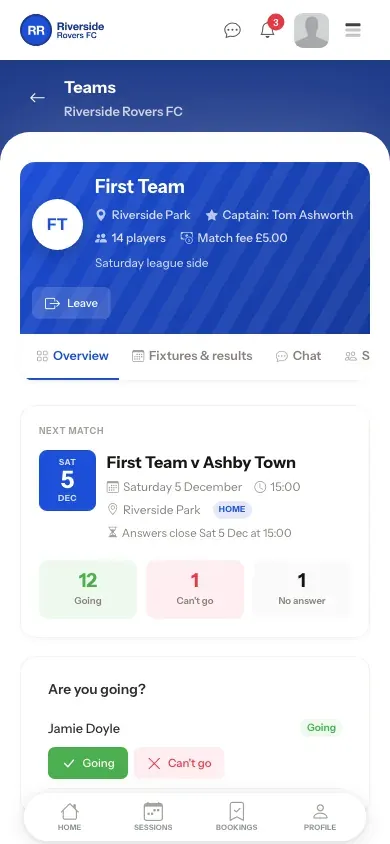
A team's page on a phone, showing the next match with how many are going and the last result

Who is playing on Saturday, answered by Thursday

Every week the same job falls to the same volunteer. A poll goes into the group chat, half the squad answer, the rest are chased one message at a time, and the side is pieced together in a spreadsheet the night before. Then somebody drops out, the match fees are collected in cash on the touchline, and nobody is quite sure who has paid.

Teams puts all of that in the club's own system. Each team, squad or side has its staff, its page and chat, its fixtures and its results. Invitations go out on their own a week before each match, players answer from the email without signing in, and anyone who has not answered is reminded. The manager picks the side from who is available, publishes it, and asks each player for the match fee in one go.
Availability without chasing
Invitations go out a week ahead, one reminder follows for anyone who has not answered, and Going or Can't go is one tap from the email, no sign-in needed.
Pick the side and publish it
Choose from who is available, mark the captain and reserves, save a draft, then publish. Only the players whose place changed are told.
Staff run their own team
A coach, manager or captain runs the team from its own page: joiners, matches, the side and match fees. No admin permission needed.
riversiderovers.clubpal.app
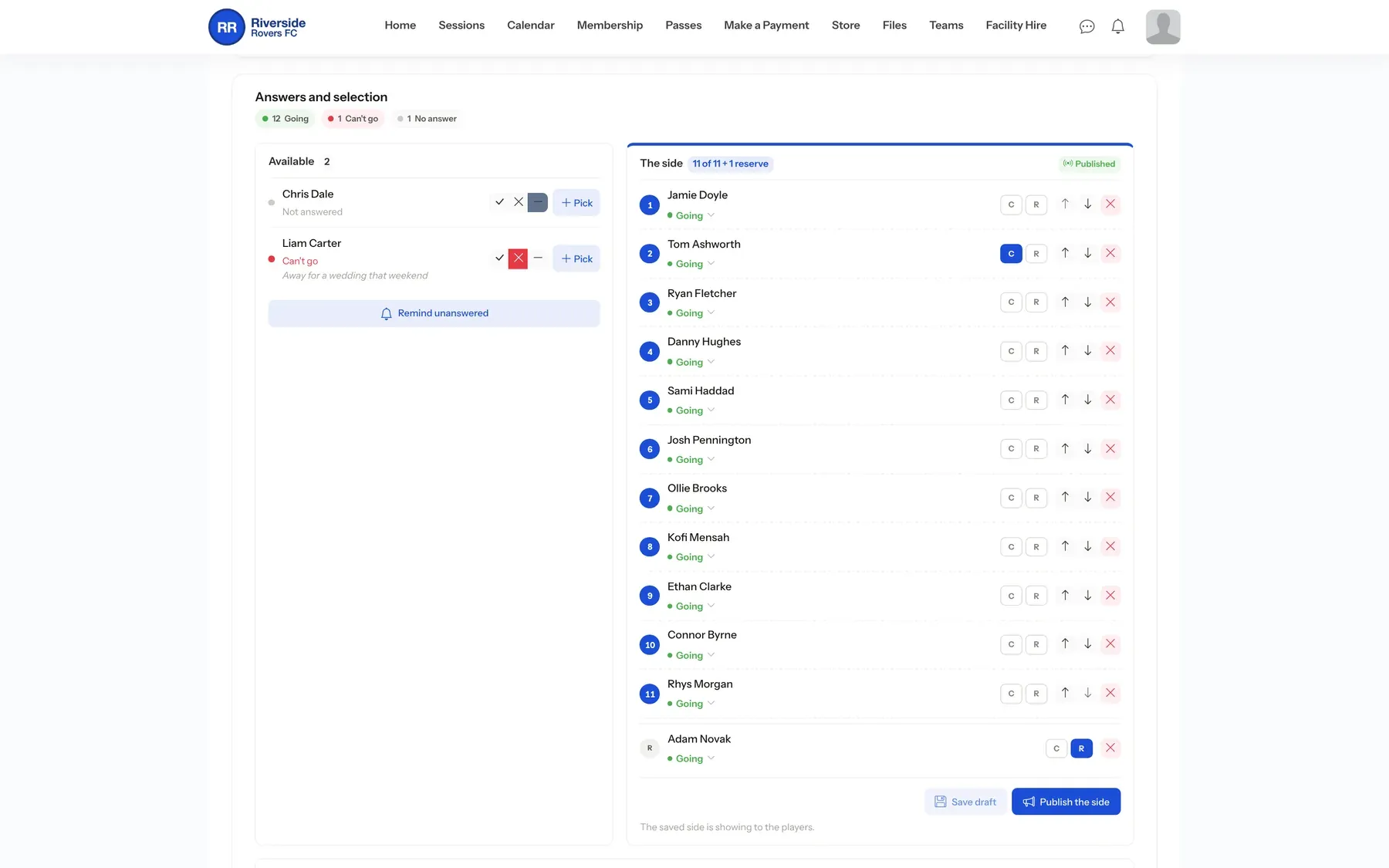
The match sheet for a football first team, with the players available on one side and the picked side, numbered, with the captain and reserves marked, on the other

Pick the side from who said yes

The match sheet lists everyone invited with their answer and any reason they gave, beside the side as it stands. Pick, reorder, mark the captain and reserves, and save a draft that only staff can see.

Publish when it is settled. Players see the side on the match page, and only the people newly picked or dropped are told, so a change of plan does not send the whole squad another round of messages.

The weekly availability round
Most clubs run their teams on a group chat and a spreadsheet
How it usually goes

A system somebody set up years ago, kept going by one person on their own phone. It works while they do it, and stops the week they cannot.

A poll in the group chat that half the squad never answers
The captain chasing the rest, one message at a time
The side kept in a spreadsheet only one person can open
Everyone told again whenever one name changes
Match fees collected in cash, and written down if anyone remembers
Every family in the group able to see every other number in it
How it works with Teams

The team, its fixtures and its answers live in the club's system, next to the members and payments you already keep there.

Invitations a week ahead and one automatic reminder
Going or Can't go in one tap from the email, no sign-in
The side picked from who is available, drafted, then published
Only the players whose place changed are told
A match fee asked of each picked player, paid online
Squad lists shown only to who you choose, and reasons for absence only to staff

Everything a team needs, run by its own staff
Joining your way
Admins only, an invite link with or without approval, ask to join, or anyone can join. People also join at sign-up, through a membership package, or from a member import.
Who can join
Give a team an age range, a gender, or both. Each family then only sees the teams that fit each person, on the sign-up form too, so the under 12s are offered to under 12s.
Fixtures and reminders
Home or away, with a meeting time, venue and notes. Invitations go a week ahead, one reminder follows, and answers can close a set number of hours before the start.
The match sheet
Captain and reserves for any sport, or captain, wicket-keeper and 12th for cricket. A qualification needed to play, such as a league registration, is flagged on the sheet and never blocks a pick.
Match fees
Each picked player is sent a payment request, due on match day. A dropped player's unpaid fee is cancelled, and a postponed or moved match takes its fees with it.
Results and match reports
Won, lost, drawn, tied or abandoned, with any score you write. Add a match report and a player of the match, shown on the match page and the team page.
Matches in the phone calendar
A member's calendar subscription carries their team's matches beside the sessions they have booked, and keeps them up to date when a match moves, is postponed or is cancelled.
Chat, email, files and news
Every team gets its own chat. Email a team, share files with it, show club news on its page, and link sessions and events to it so members see theirs first.
Privacy built in
Choose whether the squad list is shown to nobody, staff only or everyone in it. A reason for Can't go is seen only by the player and staff, and the club's Results page names no player.
riversiderovers.clubpal.app
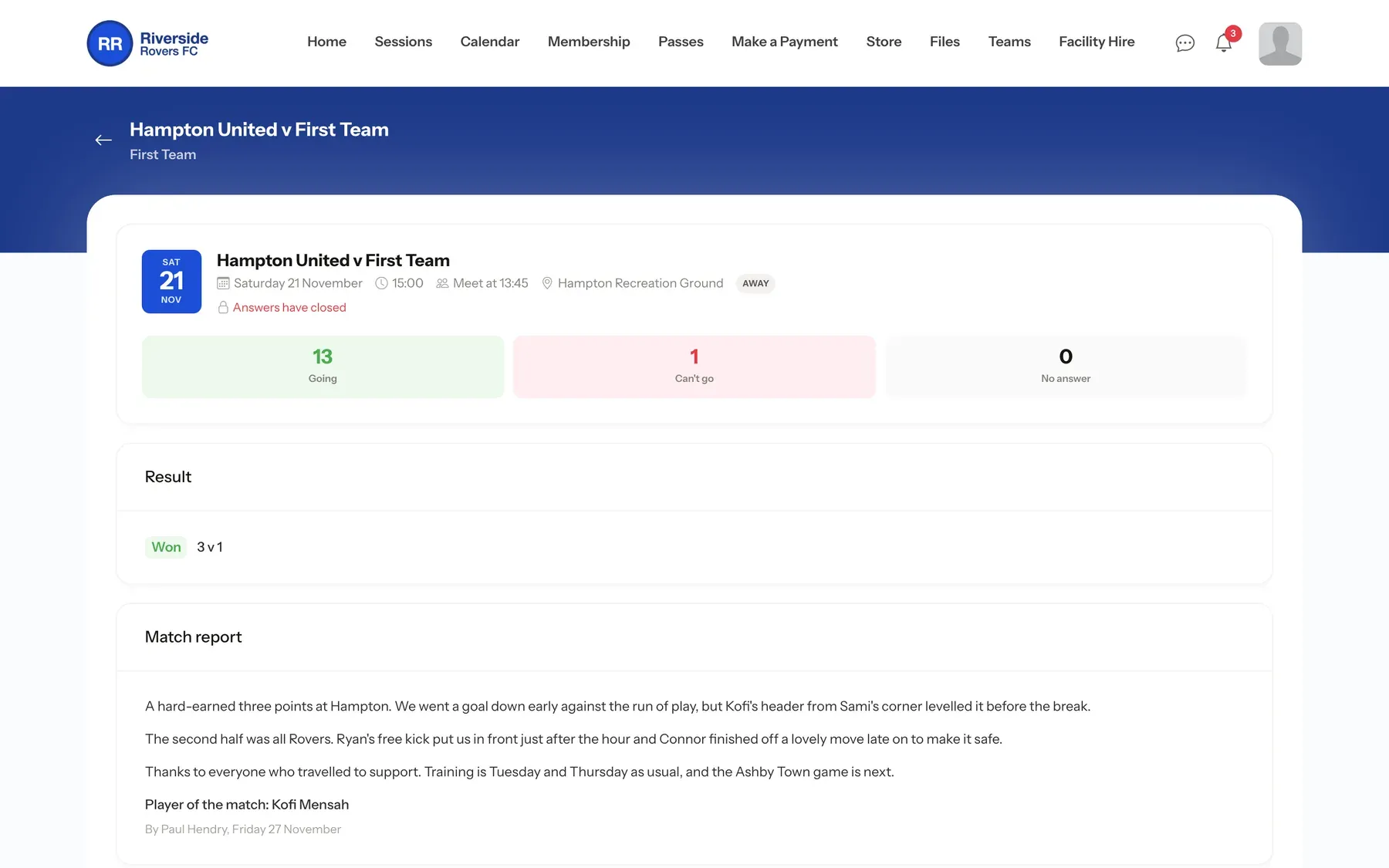
A played match with its result, a written match report and the player of the match

Results and a match report after the whistle

Once a match is played, the team's staff record how it ended and the score, then write a short report and name the player of the match if they want to.

The report shows on the match page and with the team's last result, and the club's Results page marks which matches have one. Staff can tell every player when it is published.

Everything in teams

As many teams as you run
A first team, reserves, a Sunday side and every age group, each with its own page, chat, fixtures and results
Your word for a team
Call them squads, crews or sites. The word is used on the menus, the sign-up form and every page that names a team
Staff with a role
Coach, manager or captain, chosen from the club's members. Each has the same powers on their own team and none needs an admin permission
What staff can do
Approve joiners, add and edit matches, set answers, send reminders, pick and publish the side, ask for match fees and post announcements
Venue and description
Where the team meets and a line about it, shown on its card and its page
Results link
Point See results at a league website, or leave it empty to use the club's own Results page
Archive at season end
An archived team keeps its people, matches and results on record and leaves the members' Teams page
Four ways in
Admins only, invite link, ask to join, or anyone can join, set per team
Invite link
Share it however you like, with or without approval. Make a new link and the old one stops working
Requests to join
Staff or admins approve or decline. A request nobody decides lapses after 14 days, with a reminder first
At sign-up and checkout
Teams open to join are offered on the sign-up form and when buying a membership
Through a membership package
Joined on activation, and optionally removed again when the membership expires
Member import
A Teams column puts people into existing teams from a spreadsheet
Who can join rules
An age range and a gender on a team, so families are only offered the teams that fit each person
Home or away
The match is named home side first, with date, meeting time, start, end, venue and notes
Invitations on their own
Sent a week before the match, or sooner with Send invitations now
One automatic reminder
To anyone who has not answered, 48 hours before the match or a day before answers close
One tap from the email
Going or Can't go straight from the invitation, confirmed before it is recorded, with no sign-in
Answers close when you say
Set a number of hours before the start, or take answers until the match starts
Players start as Going
For a side that nearly always turns out, so only the absences need chasing
Set an answer for someone
After a phone call, staff record it for them, whatever the deadline
Postpone or cancel
Everyone who knows of the match is told. A postponed match keeps its answers for the new date
In the calendar subscription
Team matches sit beside booked sessions in a member's phone calendar and follow every change
Draft, then publish
The side stays a draft only staff can see until it is published
Only changes are told
Publishing tells the people newly picked or dropped, not the whole squad again
Captain and reserves
One captain and any number of reserves, for any sport
Cricket match sheet
Captain, wicket-keeper and one 12th player
Players in a side
Set the number that play and the sheet warns when more are picked
Needed to play
A qualification such as a league registration is flagged when missing or expired on match day. It never blocks a pick, and its reference stays private
A request per picked player
Sent in one go after the side is published, due on the day of the match
Fees follow the match
Dropped players' unpaid fees are cancelled, and a postponed or moved match takes its fees with it
Fee status on the side
Players see their own and their family's status beside their name
Five ways a match ends
Won, lost, drawn, tied or abandoned, with free text scores such as 3-1 or 245/6
Match report
A written report and an optional player of the match, by the team's staff, with the option to tell every player
The club's Results page
Every recorded result, newest first, for signed-in members, with no player named
Team chat
Every team gets one, and staff can post announcements. A chat channel can also take a team as a source
Showing yours
Sessions and events linked to a team are shown to its members first, with Show everything a tap away
Team eligibility rule
Let only one team book a session or event
Email, files and news
A team as an email audience, a file share type and a blog's home
Squad visibility
Not shown, shown to staff only, or shown to everyone in it
Private to the team
A team's page is for its people, their families, its staff and admins. Anyone else gets a page that is not found

Invitations, reminders and selection news also arrive as notifications in the ClubPal app, free on iPhone and Android.

Questions about teams

Does it replace our availability app?

For most clubs, yes. Teams covers fixtures, invitations, one automatic reminder, Going and Can't go answers from email or the app, picking and publishing the side, match fees and results. Each team can also carry a Results link to your league's own site, opened from the team's Fixtures & results tab.

Can a coach run a team without admin access?

Yes. Name a coach, manager or captain as the team's staff and they run it from the team's own page: approving joiners, adding and editing matches, sending reminders, picking and publishing the side, asking for match fees and posting announcements. None of that needs an admin permission, and it gives them nothing outside their own team.

How do parents answer for children?

A parent answers for each child they look after in the same place they answer for themselves, on the match page or from the invitation. Each child's answer is recorded against the child, so the match sheet shows the player, not the parent.

Can players pay match fees online?

Yes, when the club takes card payments through ClubPal. Set a match fee on the team, publish the side, and each picked player is sent a payment request due on the day of the match. If a player is dropped their unpaid fee is cancelled, and if the match is postponed or moved the fees follow it.

Do teams work for juniors and safeguarding?

Yes. A junior squad can be set so only its staff see who is in it, a reason given for Can't go is seen only by the player and the staff, and the club's Results page names no player. A team's page is open only to its people, their families, its staff and admins. Who can join rules offer each age group only to the people of the right age, and a qualification needed to play is flagged on the match sheet.

Can we call them squads?

Yes. Change the word for a team in your club's terminology settings to squad, crew, site or whatever your club says. It is used on the menus, the sign-up form and every page that names a team.

Does Teams cost extra?

No. Teams, fixtures, selection, results and match reports are included in every ClubPal account, at every club size. There is no subscription and no per-member charge. ClubPal only charges a flat fee on payments your club takes, such as match fees, so a club that takes no money through ClubPal pays nothing.

Included in every account

Run your teams in one place

Fixtures, availability, selection, match fees and results are part of ClubPal, not an add-on and not a higher tier. One flat fee on what you collect, no subscription.

Loved by administrators, members, and coaches

“ClubPal really does work alongside clubs to add in features that help manage the club better. The system is designed by an active triathlete who understands the management issues behind running a club.”

“ClubPal was a no brainer. We now have a personalised one stop shop for all the needs of our members. Session costs can be paid online; no more hassle of collecting money manually.”

“It's the best decision we ever made. We used to have 3 or 4 different ways of doing our admin. ClubPal has rolled into one everything we could possibly need.”

No subscription required

Ready to simplify your club management?

Try ClubPal free today. No card required, no time limit, no catch.

If you don't take payments
$0
forever
Free in every country ClubPal supports, in every currency.
  • All features included
  • Unlimited members
  • No card required
When you take payments
$0.30 + 3.5%
per transaction only
Canada rate. 3.5% everywhere, fixed part varies by currency, see the table.
  • One flat fee, nothing else
  • Apple Pay & Google Pay
  • No subscription, no hidden fees

Trusted by 200+ clubs and 10,000+ members in 10 countries

Apple PayGoogle Pay

No contract. Export your data any time. Cancel whenever you like. The full price list is on our free club management software page.